asterisk-1.6.2.13-0 versiyonu ve aşağıdaki işlemci icin
model name : Pentium(R) Dual-Core CPU E5300 @ 2.60GHz
http://asterisk.hosting.lv/ sayfasından farklı işlemciler için codecler bulunabilir. Aşağıdaki senaryo da farklı işlemcilerde sadece codec isimleri değisecektir
cd /usr/src
service asterisk restart
wget asterisk.hosting.lv/bin162/codec_g723-ast16-icc-glibc-pentium4.so
mv codec_g723-ast16-icc-glibc-pentium4.so /usr/lib/asterisk/modules
chmod +x /usr/lib/asterisk/modules/codec_g723-ast16-icc-glibc-pentium4.so
wget asterisk.hosting.lv/bin162/codec_g729-ast16-icc-glibc-pentium4.so
mv codec_g729-ast16-icc-glibc-pentium4.so /usr/lib/asterisk/modules
chmod +x /usr/lib/asterisk/modules/codec_g729-ast16-icc-glibc-pentium4.so
asterisk -rx “module load codec_g723-ast16-icc-glibc-pentium4.so”
asterisk -rx “module load codec_g729-ast16-icc-glibc-pentium4.so”
service asterisk restart
sleep 2
asterisk -rx “core show codecs”
/etc/asterisk/sip.conf alt
ında
General sekmesinin alt
ına
nat=yes
externip=balblareal ip
kaydet kapat
It may happen that despite you have restored your mobile to factory setting, the error still exist. In this case, it is recommended that you opt for Hard reset
- Enter the code: *#7370# and press Yes to confirm initialization.
- Important Notice: It is recommended that you save all important information on your phone (e.g: memo, contacts etc)
- To make a Hard Reset on a Nokia phone that is not willing to turn on, just press simultaneously these 3 buttons:
- on/off + * + 3
- Before making a Hard reset better backup all your important information: contacts , memo…etc
powermt display dev=all
powermt release
service naviagent start
fdisk /dev/emcpowera
p <<
emcpowera1
mount /dev/emcpowera1 /data
setspn.exe -a SMTPSVC/postaci.selimozis.com SEMDC
Exchange server 2010 sadece 64 bit sistemlere kurulabilir ve sadece 64 bit sürümü vardır, Windows Server 2008 R2 üzerine Exchange 2010 kurmak icin
1. Active Directory
-------------------

� Schema master (x86 or x64): Windows Server 2003 SP1 Standard or Enterprise,
or Windows Server 2008 Standard or Enterprise,
or the Windows Server 2008 R2 Standard or Enterprise.

� Global catalog (x86 or x64): In each AD site where you plan to install Exchange 2010,
you must have GC running - Windows Server 2003 SP1 Standard or Enterprise,
or Windows Server 2008 Standard or Enterprise, or the Windows Server 2008 R2 Standard or Enterprise.

� Domain Controller (x86 or x64): In each AD site where you plan to install Exchange 2010,
you must have writable DC running - Windows Server 2003 SP1 Standard or Enterprise,
or Windows Server 2008 Standard or Enterprise, or the Windows Server 2008 R2 Standard or Enterprise.

� Active Directory Forest: Forest functional level must be Windows Server 2003 or higher.

2. Active Directory Health Check Commands:
------------------------------------------

dcdiag /test:DNS /e /v /f:dcdiag.log

nslookup gc._msdcs

repadmin /replsum /bysrc /bydest /sort:delta

If you get errors you can find more details in:

repadmin /showrepl * > showrepl.log

or in csv formatted option:

repadmin /showrepl * /csv > showrepl.csv
3. Microsoft Filter Pack kuruyoruz
http://go.microsoft.com/fwlink/?linkid=137042
4. Client Access, Hub Transport ve Mailbox role Kurulumu icin:
Open PowerShell with elevated privileges and import ServerManager module

Import-Module ServerManager

then add the required Windows Features

Add-WindowsFeature NET-Framework,RSAT-ADDS,Web-Server,Web-Basic-Auth,
Web-Windows-Auth,Web-Metabase,Web-Net-Ext,Web-Lgcy-Mgmt-Console,
WAS-Process-Model,RSAT-Web-Server,Web-ISAPI-Ext,Web-Digest-Auth,
Web-Dyn-Compression,NET-HTTP-Activation,RPC-Over-HTTP-Proxy -Restart
PS: NetTcpPortSharing servisini otomatige cekmek icin (bu servisi automatiğe çekmezsek exchange 2010 kurulum sırasında hata verir)
Set-Service NetTcpPortSharing -StartupType Automatic
kurulum öncesi işlemler bitti bir sonraki yazıda kurulumu anlatıcam.
188.132.129.13
db2licm -l check the type of license
Min Requirements
1Ghz processor
db2set -h
db2set db2comm=tcpip
db2set db2comm=
db2set -all
db2 list
DB2START
Datafile=container
DB2 use external auth. while oracle users internal
I’ve had to deal with LVM in rescue mode a few times lately, which has given me
some new insight into this stuff:
e2fsck:
- Boot into rescue mode (in RHEL/Fedora this means putting in CD 1 and typing
“linux rescue” at the boot prompt — but it’s essentially any minimal live CD).
Rescue mode does not do anything with LVM by defualt: to activiate the volume
groups, you need to issue these:#lvm vgscan
#lvm vgchange -ay
#lvm lvs
- lvs will simply display your volume group and logical volume names, use this
output to issue the e2fsck command:e2fsck. Of course, pass what ever options
/dev/volumegroupname/logicalvolumename
ot e2fsck you normally would (like -y or -c).
Re-name the / volume group:
- I never thought I’d have a legitimate reason to do this, until I found
myself wanting to back up data from one disc (from a dead system) on to another
system. I always choose the default names for VGs and LVs, so when I put my
extra disc into my live system it choked finding two volume groups named
“VolumeGroup00”.Take out that second disc, then boot into rescue mode (do not mount
anything and do not run the lvm commands from the previous example):
#vgrename VolumeGroup00 newname
Where VolumeGroup00 is the old name, and “newname” is the newname. If this
was not the root filesystem we would be done and could happily reboot as normal.
But, since this IS the root file system, we need to remake the initial ramdisk
first (if you don’t have one of those, you’re off the hook):#mount /dev/newname/LogVol00 /mnt/sysimage
#mount /dev/sda1
/mnt/sysimage/boot
#chroot /mnt/sysimage
#cp
/boot/initrd-kernelversion.img /boot/kernelversion.img.old
#mkinitrd -v -f
/boot/initrd-kernelversion.img kernelversionDon’t forget to change all
references to the old VG name. Typically this would be in grub.conf and fstab.
After that, reboot with that second disc added and you should be fine
1. Başlat Menusunden CMD yaz sağ tıkla yönetici olarak calistir.
2. Now type following command
“slmgr.vbs -ipk <insert your new product key here>”
3. To activate windows after changing the key, run “slmgr.vbs -ato”
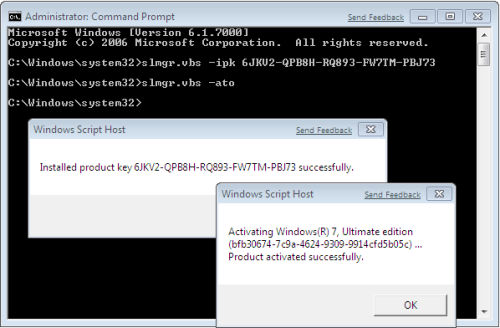
Komut Satırından Windows 7 Key Değiştirme
SQL> sho parameter compatible
NAME TYPE VALUE
———————————— ———– ——————————
compatible string 9.2.0.0.0
SQL> alter table test1 rename column b to a;
Table altered.
