mta-control delivery delete-msgs-by-rcpt [^@]+@domain.com.tr
mta-control delivery delete-msgs-by-sender MAILER-DAEMON
Article URL http://www.symantec.com/docs/TECH91805
Control Center is down or not available and you want to check the number of
messages on a Scanner that are waiting to be delivered to Control Center
a) mta-control delivery list-msgs Control-Center | grep -c Queue
b) mta-control delivery num-msgs-in-route Control-Center
c) mta-control delivery route-info Control-Center
fwopsec.conf file – remark # out all lines in this file
cpmad_opsec.conf file is not needed in Checkpoint R75 or newer.
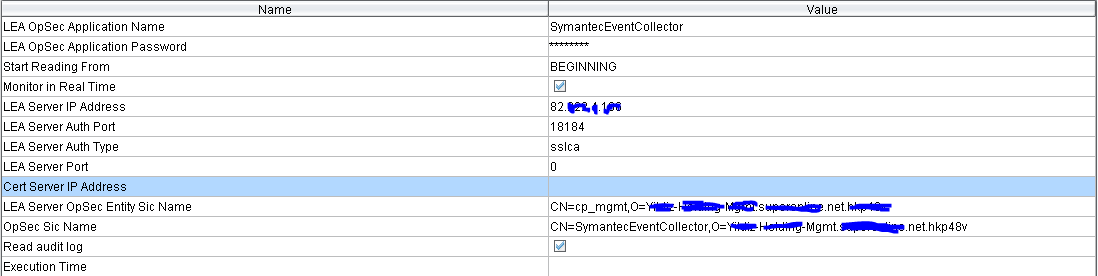
LEA Server OpSec Entity Sic Name and the Opsec Sic names are case sensitive and must look similar to this. CN=ssim451mr1,O=cma1..hipfr8
If the cpmad_opsec.conf exists on Checkpoint R75 you will need to rename this file.
Run the command below on command line interface and run this (either on the LEA server or the Firewall):
cpca_client lscert –kind SIC
find to LEA Server OPSEC Entity Sic Name on the CPLEA sensor configuration on SSIM.

Article URL http://www.symantec.com/docs/TECH174593
############### CONFIGURE YOUR SMTP SERVER AND MAIL SETTINGS ###############
$smtpServer = “smtp.gmail.com”
$smtpPort = 587
$enableSsl = $true $username = “username@gmail.com”
$password = “password”
$from = “username@gmail.com”
$to = “emialadres@mail.com”
$subject = “Test Mail” $body = “Bla Blaaa Blaa”
############### CONFIGURE YOUR SMTP SERVER AND MAIL SETTINGS ###############
$smtp = new-object Net.Mail.SmtpClient($smtpServer, $smtpPort)
$smtp.EnableSsl = $enableSsl
$smtp.Credentials = new-object Net.NetworkCredential($username, $password)
$msg = new-object Net.Mail.MailMessage
$msg.From = $from $msg.To.Add($to)
$msg.Subject = $subject
$msg.Body = $body
$smtp.Send($msg)
1)Slave the disk to a known good machine with pgp installed
2)Go Start ->run
3)Open command prompt (cmd)
4) pgpwde — enum
5)
32bit Sistemlerde cd C:\Program Files\PGP Corporation\PGP Desktop
64bit Sistemlerde cd C:\Program Files (x86)\PGP Corporation\PGP Desktop
6) pgpwde –recover — disk 1 -p (Kullanicinin Şifresi)
7) pgpwde –list-user –disk 1
8 ) pgpwde –decrypt –passphrase “password” –disk 1 (Admin Şifresi Policy’den User’in Decrypt Yetkisi olmadığı Durumlarda)
9) Displays status of encrypted/unencrypted disks
Pgpwde –disk 0 –auth -p <passphrase>
Article URL http://www.symantec.com/docs/TECH182887
Article URL http://www.symantec.com/docs/TECH149110
Article URL http://www.symantec.com/docs/TECH149478
- flexbox-release rpm’in son sürümünü indirin
http://flexbox.sourceforge.net/centos/5/x86_64/
- flexbox-release rpm’i kurun:
# rpm -Uvh flexbox-release*rpm
- hping3 rpm packet kurulumunu yapın:
# yum install hping3
Nvidia Güncel Driver Kurulumu;
sudo apt-add-repository ppa:ubuntu-x-swat/x-updates
sudo apt-get update sudo apt-get install nvidia-current
Compiz Kurulumu;
sudo apt-get install compiz compizconfig-settings-manager
sudo apt-get install compiz-fusion-plugins-extra apt-get kill;
sudo fuser -vki /var/lib/dpkg/lock; sudo dpkg –configure -a
Proxy Girme;
# export http_proxy=”http://proxy.server.com:port”
# export ftp_proxy=”http://proxy.server.com:port“
SPAM’a Takılmadan Toplu Mail Gönderebilmek için Yapılması Gerekenler
- Mail sunucusu olarak kullandığınız ip adresin’nin blacklistlere girmemiş olması adreslerinden IP Blacklist kontrolu yapabilirsiniz.
- http://www.spamcop.net/bl.shtml
- http://www.spamhaus.org/sbl/
- http://www.mail-abuse.com/cgi-bin/lookup
- http://www.spambag.org/query.html
- Mail sunucunuzun ip adresinin reverse kaydı PTR(pointer record) olmalı. www.mxtoolbox.com üzerinde ip adresinin PTR kaydı kontrol edilebilir.
- Adresleri BCC (blind carbon copy) kısmını kullanarak göndermeyin.
- Alan adınızın (domain address) dns kayıtlarında SPF (Sender Policy Framework) kaydınızın bulunması gerekiyor. Spf kaydını kontrol etmek için http://www.kitterman.com/spf/validate.html adresi kullanılabilir.Örnek bir SPF Kaydı: v=spf1 mx ptr mx:mail.adresi.com.tr mx:mail2.adresi.com.tr ip4:62.225.15.98 -all
- Microsoft Sender Id’ye kayıt oluyoruz.
Mesaj içeriğinde kendi alan adınızı yazıp senderid@microsoft.com ‘ a mail atıyoruz. Bir çok alan adı için yapıcaksanız her bir satıra bir alan adı denk gelecek şekilde yazın. Otomatik bir e-posta bizi mail’imizin senderid sistemine ulaştığına dair bilgilendirecek ve ortalama 4-5 gün içinde aktif olacaktır. - Reverse DNS kaydı ve SPF kaydı tam olan mailler YAHOO’da inbox’a düşer.
- Hosting hizmeti alınıyorsa firmanın bir günlük mail limiti olup olmadığına dikkat edilmesi gerekir. Örnek Godaddy sunucusu günde en fazla 250 mesaj gönderir.
- Mailin Konusu(subject) içeriği (body content) hakkında bilgi vermesi gerekmektedir.
- Mail içerisinde aynı kelimelerin tekrar tekrar kullanılmamasına dikkat edilmesi gerekmektedir.
- Mail içerisinde “Click Here” şeklinde linkler kullanılmamalıdır.
- Gönderim yapan ip’nin sender score’unu sorgulamak için https://www.senderscore.org/ adresini kullanabilirsiniz.
ControlCenter’de Scanner’i update ettikten sonra versiyon sekmesi unkown gözüktügü durumlarda yapılması gerekenler;
1) Login via SSH using the admin account
2) Run the CLI command rpmdb -r
3) Run the CLI command service controlcenter restart
Now, the Control Center should display the correct version.
| Activate Dag RPM Repository to install FIGlet. |
| Red Hat Enterprise Linux 5 / i386: |
| # rpm -Uhv http://apt.sw.be/redhat/el5/en/i386/rpmforge/RPMS/rpmforge-release-0.3.6-1.el5.rf.i386.rpm |
|
Red Hat Enterprise Linux 5 / x86_64:
|
| # rpm -Uhv http://apt.sw.be/redhat/el5/en/x86_64/rpmforge/RPMS//rpmforge-release-0.3.6-1.el5.rf.x86_64.rpm |
| Now install figlet using, |
| # yum install figlet -y |
| After successfully installation, run below command to generate ASCII Text Banner, |
| # figlet -t SelimOzis.com |

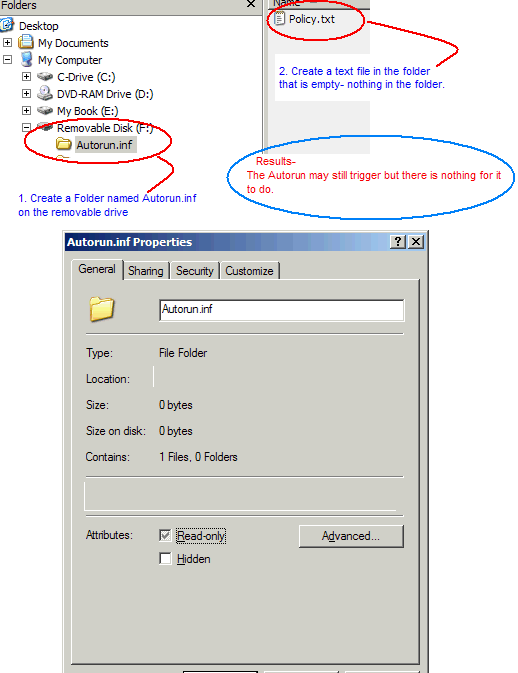
Policy.txt"dosyasınıda özelliklerden "Read Only" yapın
1.) USB Disk içerisinde “Autorun.inf” adında bir klasör oluşturun.
2.) Bu klasör içinde “Policy.txt” adında bir dosya oluşturun.
3.) “Autorun.inf” Klasörünü “Read Only” yapın
4.) “Policy.txt”dosyasınıda özelliklerden “Read Only” yapın
